

 AhsayCBS
Windows Requirements for Ahsay Go
Before attempting to install Ahsay Go onto your system, there are several requirements that must first be considered in order to ensure maximum compatibility with your system. Ensure that these requirements are met in order to run Ahsay Go reliably on your system:
For a list of general requirements that apply to all operating systems, please refer to: Ahsay Go Requirements
Below are the Windows-specific requirements for Ahsay Go:
Antivirus Exclusion Requirement
To optimize the performance of Ahsay Go on Windows, and to avoid conflict with your antivirus software, refer to the following article for the list of processes and directory paths that should be added to all antivirus software whitelists / exclusion lists:
Configure Antivirus Exclusions
The bJW.exe process is automatically added to Windows Defender exclusion list for Windows 10 onwards and Windows Server 2016 onwards during installation / upgrade via installer or upgrade via AUA.
For mobile backups, the mobile backup destination must also be added to all antivirus software whitelists / exclusion lists.
Upgrade VMware Tools
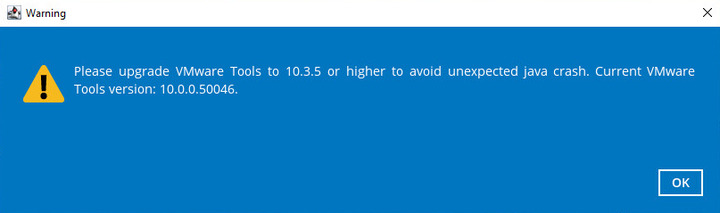
To avoid an unexpected java crash, if the Windows machine is a guest VM hosted on a VMware Host, it is highly recommended that the VMware tools version installed on the guest VM is 10.3.5 or higher.
Below is the warning message that will be displayed if the version of the VMWare Tools is lower than 10.3.5.
For more information on how to download VMWare Tools, please refer to this article: