AhsayCBS
macOS Requirements for Ahsay Go
The following are the requirements to install Ahsay Go onto a macOS operating system.
For a list of general requirements that apply to all operating systems, please refer to: Ahsay Go Requirements
Below are the macOS-specific requirements for Ahsay Go:
Full Disk Access Permission Requirements
macOS 10.15 or higher requires "Full Disk Access" permission to be granted in:
System Preferences > Security & Privacy > Full Disk Access > Privacy tab to Ahsay Go and java.
Due to an upgrade in security on macOS 10.15 or higher, additional security settings are required to allow applications to access the machine. Ahsay Go requires "Full Disk Access" permission to be able to access your files for selection and backup. Also, without "Full Disk Access" permission, Ahsay Go will not be able to restore files to the machine.
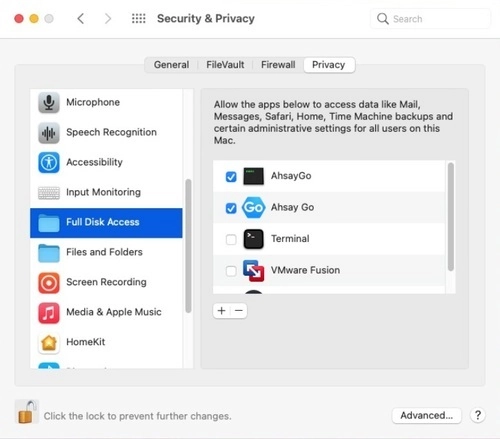
For more details on how to setup the Full Disk Access permission, please refer to Set Up Full Disk Access Permission.
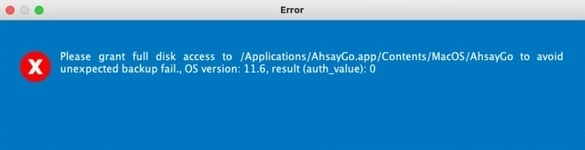
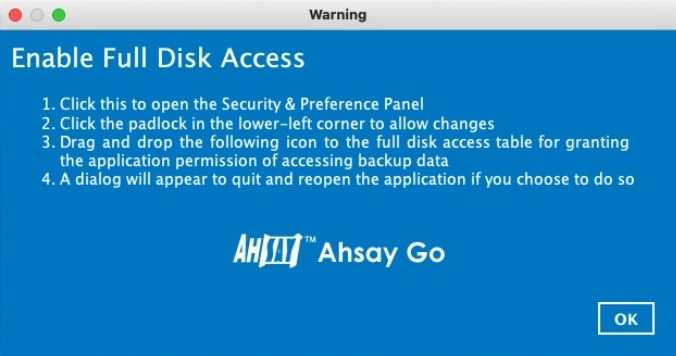
If Ahsay Go does not have "Full Disk Access" permission, upon opening Ahsay Go, the following messages will be displayed and Ahsay Go will not open until the "Full Disk Access" permission is granted:

Root Drive Installation Requirements
Ahsay Go must be installed on the root drive of a volume.
e.g.
/Applications.../ARM (M-series) CPU Requirements
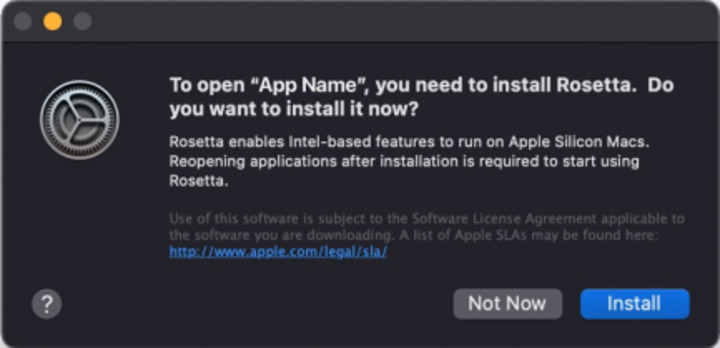
For Ahsay Go running on macOS 11 or above on ARM (M-series) CPU machine, the installation of Rosetta 2 is required that enables applications built for Intel CPU to run on an ARM (M-series) CPU machine: If you need to install Rosetta on your Mac
If Ahsay Go is installed and run for the first time on macOS 11 or above on ARM (M-series) CPU machine, there will be a pop-up message that requests installation of Rosetta. When the following window appears, click Install to proceed.