

 AhsayCBS
Ahsay Go - PostgreSQL Requirements
Java Heap Size
The default Java heap size setting on Ahsay Go is 2048MB. It is highly recommended to increase the Java heap size setting to be at least 4096MB to improve backup and restore performance. The actual heap size is dependent on amount of free memory available on your PostgreSQL Server.
Network Drive
The login accounts for network drives must have read and write access permission to ensure that backup and restore would be successful.
PostgreSQL Server Requirements
Please ensure that the following requirements and conditions are met on the PostgreSQL server.
PostgreSQL Version
Ahsay Go is installed on the PostgreSQL Server version 12 – 16 for Windows and for Linux using the root account.
PostgreSQL Server Status
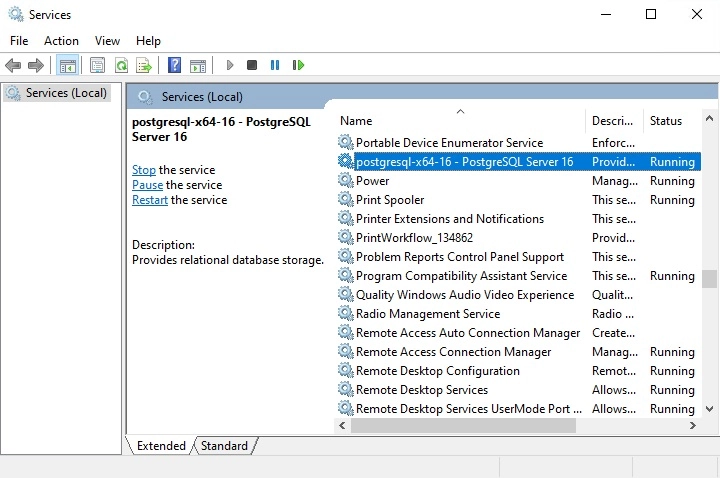
The PostgreSQL server instance is online.
Example: PostgreSQL v16 on Windows Server 2019 (64-bit), the default service name is PostgreSQL x64-16.
TCP/IP Port
Check the listening port of the PostgreSQL server instance (default is 5432).
Windows
C:\>netstat -b -a
Active Connections
 Proto Local Address Foreign Address State
 TCP 0.0.0.0:135 cd..-std:0 LISTENING
 RpcSs
[svchost.exe]
 TCP 0.0.0.0:445 pgsqk116-w2k22:0 LISTENING
Can not obtain ownership information
 TCP 0.0.0.0:2179 pgsqk116-w2k22:0 LISTENING
[vmms.exe]
 TCP 0.0.0.0:5432 pgsqk116-w2k22:0 LISTENING
[PostgreSQLd.exe]
 TCP 0.0.0.0:3389 pgsqk116-w2k22:0 LISTENING
 TermService
[svchost.exe]
 TCP 0.0.0.0:49665 pgsqk116-w2k22:0 LISTENING
[lsass.exe]
 TCP 0.0.0.0:49666 pgsqk116-w2k22:0 LISTENING
 EventLog
[svchost.exe]
 TCP 0.0.0.0:49667 pgsqk116-w2k22:0 LISTENING
[spoolsv.exe]
 TCP 0.0.0.0:49668 pgsqk116-w2k22:0 LISTENING
Linux
# netstat -an|more
Active Internet connections (servers and established)
Proto Recv-Q Send-Q Local Address Foreign Address State
tcp 0 0 127.0.0.1.5433 0.0.0.0:* LISTEN
tcp 0 0 127.0.0.1.5432 0.0.0.0:* LISTEN
tcp 0 0 0.0.0.0:22 0.0.0.0:* LISTEN
tcp 0 0 127.0.0.1:631 0.0.0.0:* LISTEN
tcp 0 0 127.0.0.53:53 0.0.0.0:* LISTEN
tcp6 0 0 :::22 :::* LISTEN
tcp6 0 0 :::80 :::* LISTEN
udp 0 0 127.0.0.1:44747 127.0.0.1:44747 ESTABLISHED
udp 0 0 127.0.0.5.:53 0.0.0.0:*
udp 0 0 0.0.0.0:43771 0.0.0.0:*
udp 0 0 127.0.0.1:50610 127.0.0.1:50610 ESTABLISHED
udp6 0 0 :::50015 :::*
udp6 0 0 ::::5353 :::*
raw6 0 0 ::::58 :::*
Localhost
Verify that “localhost” on the PostgreSQL server is resolvable and “localhost” is allowed to access the PostgreSQL server instance on the PostgreSQL service listening port (default 5432).
C:\>ping localhost
Pinging pgsql16-w2k22 [::1] with 32 bytes of data:
Reply from ::1: bytes=32 time<1ms
Reply from ::1: bytes=32 time<1ms
Reply from ::1: bytes=32 time<1ms
Reply from ::1: bytes=32 time<1ms
Ping statistics for ::1:
 Packets: Sent = 4, Received = 4, Lost = 0 (0% loss),
Approximate round trip times in milli-seconds:
 Minimum = 0ms, Maximum = 0ms, Average = 0ms
C:\>
# telnet localhost 5432
Trying 127.0.0.1...
Connected to localhost.
Escape character is '^]'
J
5.6.31vB#'8%/kQ3K\n6``AePostgreSQL_native_password
The telnet utility is not installed by default on Windows version 10 - 11.