

 AhsayCBS
Ahsay Go - MySQL Restore
To restore a MySQL Database backup set, follow the steps below:
MySQL Database Automatic and Manual Restore
-
Login to MySQL Server using MySQL Command Line Client and verify the database instance is running.
Enter password: ********
Welcome to the MySQL monitor. Commands end with ; or \g.
Your MySQL connection id is 19
Server version: 5.7.17-log MySQL Community Server (GPL)
Copyright (c) 2000, 2016, Oracle and/or its affiliates. All rights
reserved.
Oracle is a registered trademark of Oracle Corporation and/or its
affiliates. Other names may be trademarks of their respective
owners.
Type 'help;' or '\h' for help. Type '\c' to clear the current input
statement.
mysql> show databases;
+--------------------+
| Database 			 |
+--------------------+
| information_schema |
| mysql 			 |
| performance_schema |
| sakila 			 |
| sys 				 |
| world 			 |
+--------------------+
6 rows in set (0.00 sec)
mysql>
This step is applicable for Automatic Restore only.
-
In the Ahsay Go main interface, click the Restore icon.
-
Select the backup set and destination.
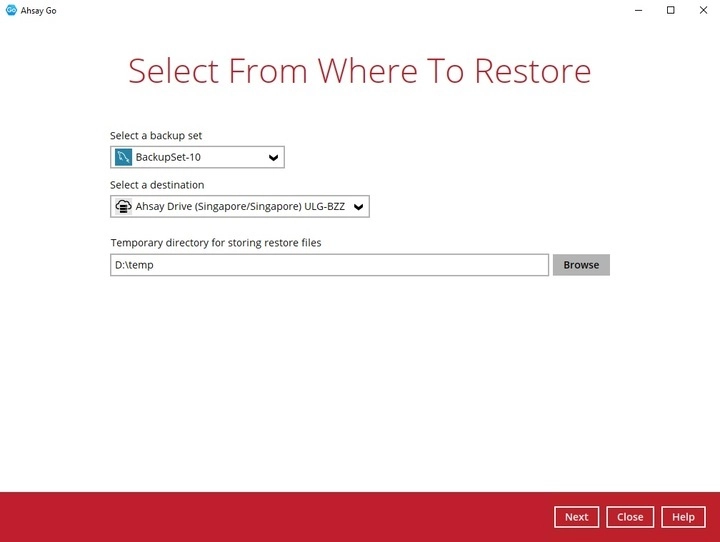
You can select the temporary directory for storing temporary files by clicking the Browse button.

-
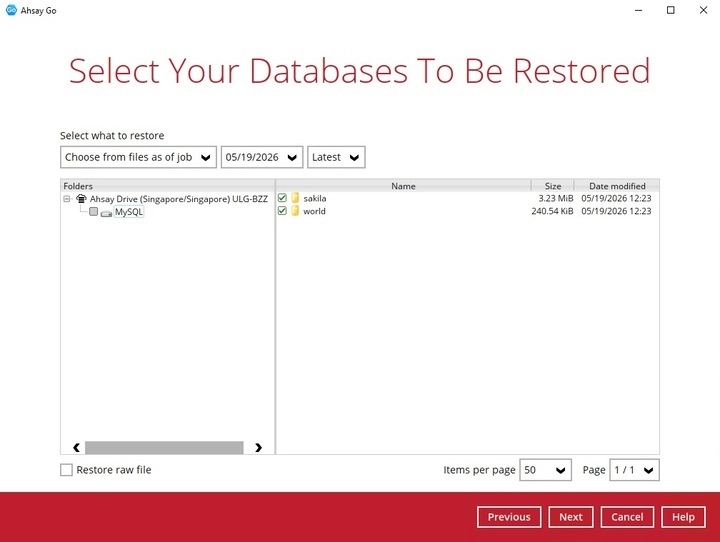
Select the database(s) you would like to restore.
For Automatic Restore, select the MySQL node from a specific backup job then select the database(s) that you would like to restore. Click Next to proceed when you are done with the selection.
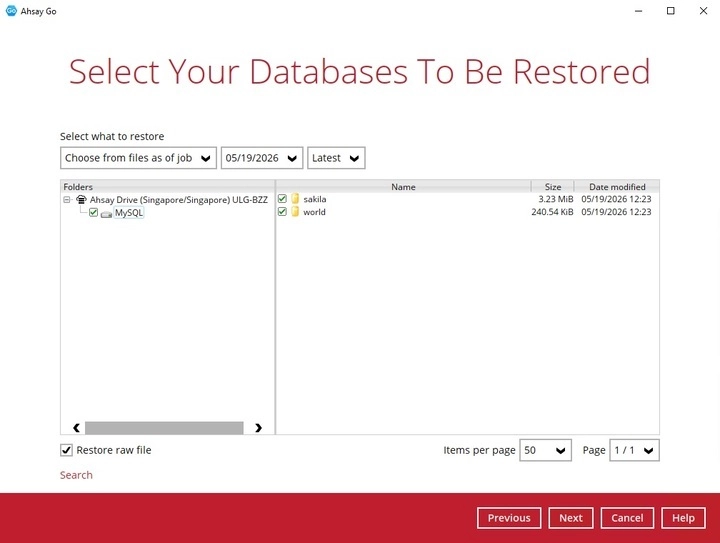
For Manual Restore, tick Restore raw file then click Next to proceed.
LIMITATIONS
If you would like to restore database to an alternate SQL server with the Restore raw file option, make sure you have checked the Restore raw file option.
-
Select to restore the MySQL Databases automatically or select the location path where you would like the raw file(s) to be saved for manual restore:
Automatic Restore
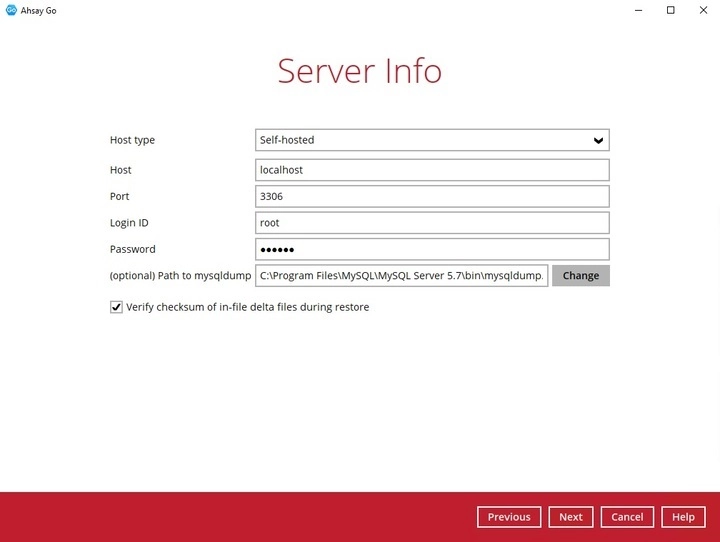
Specify the host, port, username and password. The “Verify checksum” setting may also be modified, then click Next to proceed.
Specify a new name for the databases, then click Restore to start the automatic restoration of databases.
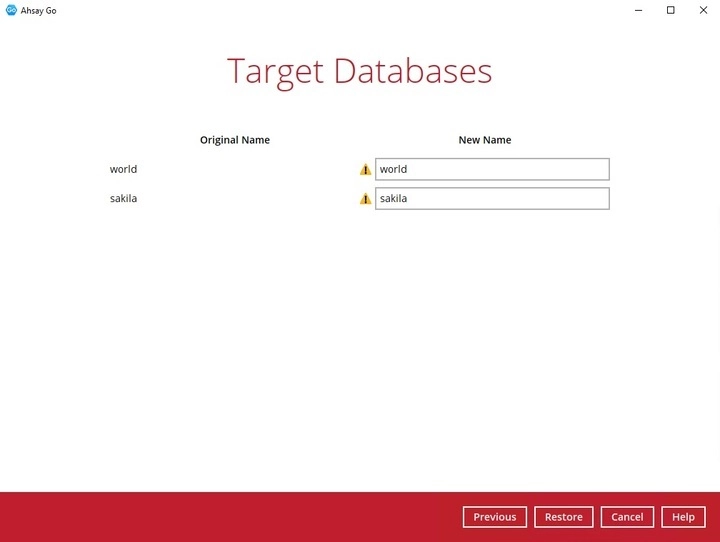
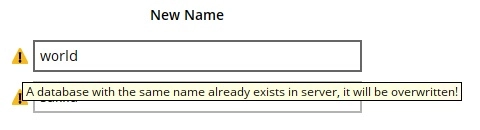
If the original name and the new name of the database is the same, the original database will be overwritten with the database to be restored and this warning message will be available.
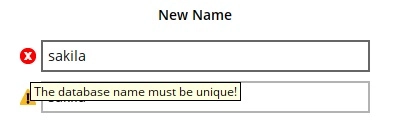
If there are identical new name for the databases, the restoration will not be allowed to proceed and this error message will be available.
Restore Raw File
Choose the location path where you would like the raw file(s) to be restored to. Click Restore to proceed.
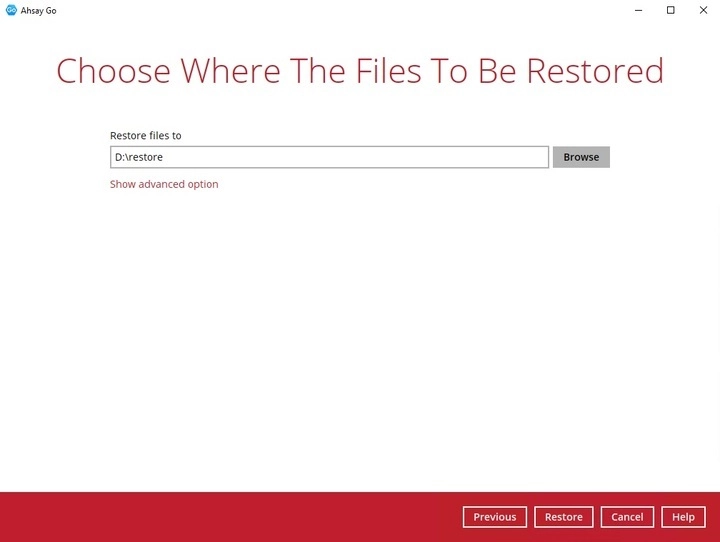
If you would like to modify the “Verify checksum of in-file delta files during restore” setting, click Show advanced option.

Verify checksum of in-file delta files during restore.
By enabling this option, the checksum of in-file delta files will be verified during the restore process. This will check the data for errors during the restore process and create a data summary of the in-file delta files which will be included in the report.
-
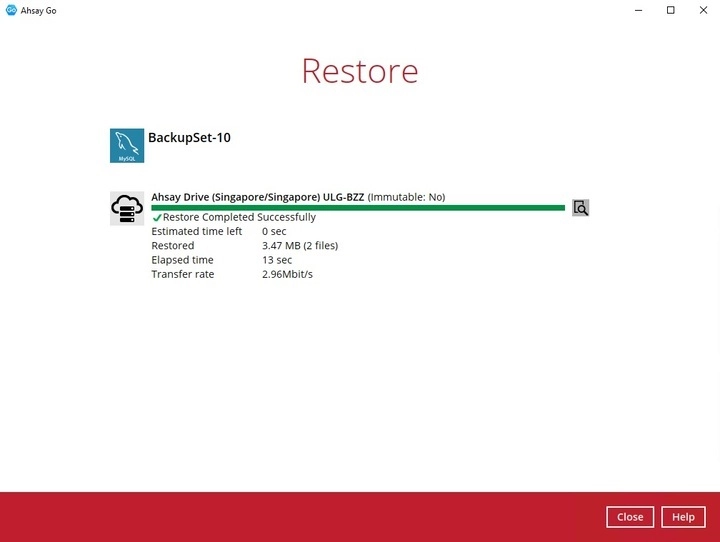
Once restoration is finished, “Restore Completed Successfully” will be displayed.
-
Verify the restore.
For Automatic Restore
Using MySQL Command Line Client, you can list the restored databases and tables. Example: Listing the tables in the database using show tables
mysql> show databases;
+--------------------+
| Database 			 |
+--------------------+
| information_schema |
| mysql 			 |
| performance_schema |
| sakila 			 |
| sys 				 |
| world 			 |
+--------------------+
6 rows in set (0.00 sec)

mysql> show tables in sakila;
+----------------------------+
| Tables_in_sakila 			 |
+----------------------------+
| actor 					 |
| actor_info 				 |
| address 					 |
| category 					 |
| city 						 |
| country 					 |
| customer 					 |
| customer_list 			 |
| film 						 |
| film_actor 				 |
| film_category 			 |
| film_list					 |
| film_text 				 |
| inventory 				 |
| language 					 |
| nicer_but_slower_film_list |
| payment 					 |
| rental 					 |
| sales_by_film_category 	 |
| sales_by_store 			 |
| staff 					 |
| staff_list 				 |
| store 					 |
+----------------------------+
23 rows in set (0.04 sec)
mysql> show tables in world;
+-----------------+
| Tables_in_world |
+-----------------+
| city 			  |
| country 		  |
| countrylanguage |
+-----------------+
3 rows in set (0.00 sec)
mysql>
For Manual Restore
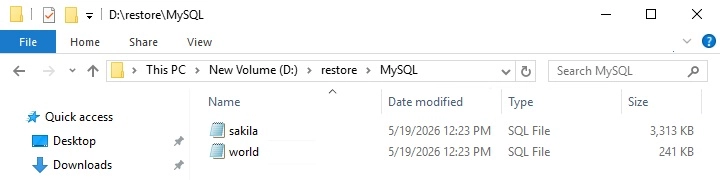
Check the location on the local machine to verify the MySQL database files have been restored.
Example: Using Windows File Explorer
Recovering MySQL Databases
-
Login to MySQL Server using MySQL Command Line Client and verify the database instance is running.
Enter password: ****** Welcome to the MySQL monitor. Commands end with ; or \g. Your MySQL connection id is 10 Server version: 5.6.31-log MySQL Community Server (GPL) Copyright (c) 2000, 2016, Oracle and/or its affiliates. All rightsreserved. Oracle is a registered trademark of Oracle Corporation and/or its affiliates. Other names may be trademarks of their respective owners. Type 'help;' or '\h' for help. Type '\c' to clear the current input statement. mysql> show databases; +--------------------+ | Database | +--------------------+ | information_schema | | mysql | | sakila | | performance_schema | | sys | | world | +--------------------+ 6 rows in set (0.00 sec) mysql> -
Create the database names that needs to be recovered.
Example: sakila and world
mysql> create database sakila; Query OK, 1 row affected (0.00 sec) mysql> create database world; Query OK, 1 row affected (0.00 sec) -
Recover Databases
Repeat the following steps for all databases you wish to restore.
mysql> use sakila; mysql> source D:\restored\MySQL\sakila.sql Query OK, 0 rows affected (0.01 sec) Query OK, 148 rows affected (1.9 sec) Records: 148 Duplicates: 0 Warnings: 0 mysql> use world; mysql> source D:\restored\MySQL\world.sql Query OK, 0 rows affected (0.00 sec) Query OK, 4079 rows affected (0.03 sec) Records: 4079 Duplicates: 0 Warnings: 0 Query OK, 0 rows affected (0.01 sec) -
Check the database status
Example: Listing the tables in the database using show tables
mysql> show databases;
+--------------------+
| Database 			 |
+--------------------+
| information_schema |
| classicmodels 	 |
| mysql 			 |
| performance_schema |
| sakila 			 |
| world 			 |
+--------------------+
6 rows in set (0.00 sec)
mysql> show tables in world;
+-----------------+
| Tables_in_world |
+-----------------+
| city 			  |
| country		  |
| countrylanguage |
+-----------------+
3 rows in set (0.00 sec)
mysql> show tables in sakila;
+----------------------------+
| Tables_in_sakila 			 |
+----------------------------+
| actor 					 |
| actor_info 				 |
| address 					 |
| category 					 |
| city 						 |
| country 					 |
| customer 					 |
| customer_list 			 |
| film 						 |
| film_actor 				 |
| film_category 			 |
| film_list 				 |
| film_text 				 |
| inventory 				 |
| language 					 |
| nicer_but_slower_film_list |
| payment 					 |
| rental 					 |
| sales_by_film_category 	 |
| sales_by_store 			 |
| staff 					 |
| staff_list 				 |
| store 					 |
+----------------------------+
23 rows in set (0.00 sec)