

 AhsayCBS
Ahsay Go - MySQL Requirements
Java Heap Size
The default Java heap size setting on Ahsay Go is 2048MB. It is highly recommended to increase the Java heap size setting to be at least 4096MB to improve backup and restore performance. The actual heap size is dependent on amount of free memory available on your MySQL Database Server.
Network Drive
The login accounts for network drives must have read and write access permission to ensure that backup and restore would be successful.
MySQL Database Server Requirements
Please ensure that the following requirements and conditions are met on the MySQL database server.
MySQL Version
Ahsay Go is installed on the MySQL database server for Windows and MySQL version 5.7 or above database server using the root account for Linux.
MySQL Database Status
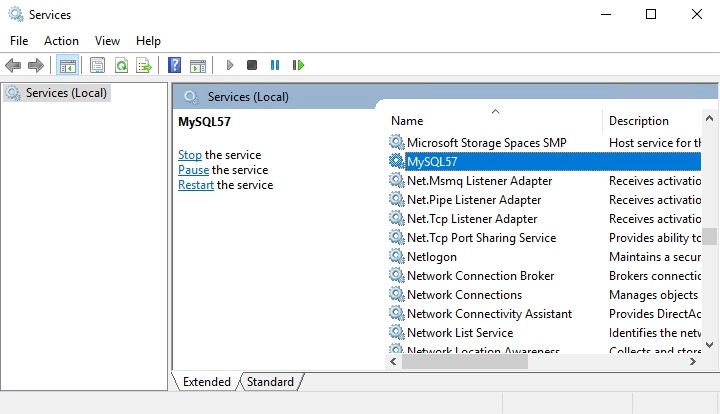
The MySQL database instance is online.
Example: MySQL v5.7 on Windows Server 2016 (64-bit), the default service name is MySQL57.
Example: MySQL 8 on CentOS 9
# service mysqld status
Redirecting to /bin/systemctl status mysqld.service
● mysqld.service - MySQL Server
     Loaded: loaded (/usr/lib/systemd/system/mysqld.service; enabled; preset: d>
     Active: active (running) since Mon 2026-07-06 21:26:10 EDT; 15min ago
       Docs: man:mysqld(8)
             http://dev.mysql.com/doc/refman/en/using-systemd.html
    Process: 1090 ExecStartPre=/usr/bin/mysqld_pre_systemd (code=exited, status>
   Main PID: 1720 (mysqld)
     Status: "Server is operational"
      Tasks: 37 (limit: 48748)
     Memory: 463.7M (peak: 465.7M)
        CPU: 4.008s
     CGroup: /system.slice/mysqld.service
             └─1720 /usr/sbin/mysqld

Jul 06 21:25:54 centos9.ahsay.local systemd[1]: Starting MySQL Server...
Jul 06 21:26:10 centos9.ahsay.local systemd[1]: Started MySQL Server.
TCP/IP Port
Check the listening port of the MySQL database instance (default is 3306).
Windows
C:\>netstat -b -a
Active Connections
 Proto Local Address Foreign Address State
 TCP 0.0.0.0:135 w2k16-std:0 LISTENING
 RpcSs
 [svchost.exe]
 TCP 0.0.0.0:445 w2k16-std:0 LISTENING
 Can not obtain ownership information
 TCP 0.0.0.0:2179 w2k16-std:0 LISTENING
 [vmms.exe]
 TCP 0.0.0.0:3306 w2k16-std:0 LISTENING
 [mysqld.exe]
 TCP 0.0.0.0:3389 w2k16-std:0 LISTENING
 TermService
 [svchost.exe]
 TCP 0.0.0.0:49665 w2k16-std:0 LISTENING
 [lsass.exe]
 TCP 0.0.0.0:49666 w2k16-std:0 LISTENING
 EventLog
 [svchost.exe]
 TCP 0.0.0.0:49667 w2k16-std:0 LISTENING
 [spoolsv.exe]
 TCP 0.0.0.0:49668 w2k16-std:0 LISTENING
 SessionEnv
 [svchost.exe]
 TCP 0.0.0.0:49669 w2k16-std:0 LISTENING
 PolicyAgent
Linux
# netstat -an|more
Active Internet connections (servers and established)
Proto Recv-Q Send-Q Local Address           Foreign Address         State
tcp        0      0 0.0.0.0:3306            0.0.0.0:*               LISTEN
tcp        0      0 127.0.0.1:631           0.0.0.0:*               LISTEN
tcp        0      0 0.0.0.0:445             0.0.0.0:*               LISTEN
tcp        0      0 0.0.0.0:139             0.0.0.0:*               LISTEN
tcp        0      0 0.0.0.0:22              0.0.0.0:*               LISTEN
tcp        0      0 10.16.30.35:22          192.168.22.5:51239      ESTABLISHED
tcp6       0      0 ::1:631                 :::*                    LISTEN
tcp6       0      0 :::445                  :::*                    LISTEN
tcp6       0      0 :::33060                :::*                    LISTEN
tcp6       0      0 :::139                  :::*                    LISTEN
tcp6       0      0 :::22                   :::*                    LISTEN
udp        0      0 127.0.0.1:323           0.0.0.0:*
udp        0      0 0.0.0.0:5353            0.0.0.0:*
udp6       0      0 ::1:323                 :::*
udp6       0      0 :::5353                 :::*
MySQL Dump Utility
The mysqldump utility is installed on the MySQL database server.
Windows
Windows: the default location for the mysqldump utility for MySQL v5.6.x is located in the following folder:
C:\Program Files\MySQL\MySQL Server 5.7\bin
Linux
To locate the mysqldump utility use the "whereis" command.
# whereis mysqldump
mysqldump: /usr/bin/mysqldump /usr/share/man/man1/mysqldump.1.gz
MySQLDump Utility Version
The mysqldump utility is the same version as the MySQL database.
To check the mysqldump version use the mysqldump --version command.
Windows
Example: MySQL v5.7
C:\Program Files\MySQL\MySQL Server 5.7\bin>mysqldump --version
mysqldump Ver 10.13 Distrib 5.7.17, for Win64 (x86_64)
C:\Program Files\MySQL\MySQL Server 5.7\bin>
MySQL database version:
Example: MySQL v5.7
mysql> select version();
+------------+
| version() |
+------------+
| 5.7.17-log |
+------------+
1 row in set (0.03 sec)
Linux
Example: MySQL 8 on CentOS 9
# mysqldump --version
mysqldump  Ver 8.0.44 for Linux on x86_64 (MySQL Community Server - GPL)
To check the MySQL database version either:
From the Linux command line, use the /usr/bin/mysql --version command.
# /usr/bin/mysql --version
/usr/bin/mysql  Ver 8.0.44 for Linux on x86_64 (MySQL Community Server - GPL)
or
Log in to MySQL instance and use select version() ; command.
# mysql -u root -p
Enter password:
Welcome to the MySQL monitor. Commands end with ; or \g.
Your MySQL connection id is 8
Server version: 8.0.44 MySQL Community Server - GPL

Copyright (c) 2000, 2025, Oracle and/or its affiliates.

Oracle is a registered trademark of Oracle Corporation and/or its
affiliates. Other names may be trademarks of their respective
owners.

Type 'help;' or '\h' for help. Type '\c' to clear the current input statement.

mysql> select version();
+-----------+
| version() |
+-----------+
| 8.0.44    |
+-----------+
1 row in set (0.00 sec)
User Account Privileges
A MySQL database user account with the following privileges must be setup for the backup operation.
Example: MySQL v5.6
mysql> GRANT ALL PRIVILEGES ON *.* TO "username"@"localhost" IDENTIFIED BY "password";
Query OK, 0 rows affected (0.00 sec)
mysql> GRANT ALL PRIVILEGES ON *.* TO "username"@"localhost.localdomain" IDENTIFIED BY "password";
Query OK, 0 rows affected (0.00 sec)
mysql> FLUSH PRIVILEGES;
Query OK, 0 rows affected (0.01 sec)
mysql>
For MySQL 8 the use of GRANT to define account authentication characteristic is deprecated. For more information, please refer to the MySQL 8.0 Reference Manual. As an alternative, you must first create the user and set the authentication characteristic by using CREATE USER before setting the privileges of the user using GRANT.
Example: MySQL v8.0
mysql> CREATE USER 'root'@'localhost.localdomain' IDENTIFIED BY 'Abcd123$%';
Query OK, 0 rows affected (0.32 sec)
mysql> GRANT ALL PRIVILEGES ON *.* TO 'root'@'localhost';
Query OK, 0 rows affected (0.01 sec)
mysql> GRANT ALL PRIVILEGES ON *.* TO 'root'@'localhost.localdomain';
Query OK, 0 rows affected (0.12 sec)
mysql> FLUSH PRIVILEGES;
Query OK, 0 rows affected (0.01 sec)
LocalHost
Verify that “localhost” on the MySQL database server is resolvable and “localhost” is allowed to access the MySQL database instance on the MySQL service listening port (default 3306).
C:\>ping localhost
Pinging 10.90.10.40 with 32 bytes of data:
Reply from 10.90.10.40: bytes=32 time<1ms TTL=64
Reply from 10.90.10.40: bytes=32 time<1ms TTL=64
Reply from 10.90.10.40: bytes=32 time<1ms TTL=64
Reply from 10.90.10.40: bytes=32 time<1ms TTL=64
Ping statistics for 10.90.10.40:
	Packets: Sent = 4, Received = 4, Lost = 0 (0% loss),
Approximate round trip times in milli-seconds:
	Minimum = 0ms, Maximum = 0ms, Average = 0ms
C:\>
# telnet localhost 3306
Trying 127.0.0.1...
Connected to localhost
Escape character is '^]'
J
5.6.31vB#'8%/kQ3K\n6' 'Aemysql_native_password
The telnet utility is not installed by default on some windows version.
MySQL Virtual System Databases
Exclude the “information_schema” and “performance_schema” databases which are MySQL virtual system databases, they contain information about the user databases on the MySQL instance. They are read-only and cannot be backed up.
mysql> show databases;
+--------------------+
| Database           |
+--------------------+
| information_schema |
| mysql              |
| performance_schema |
| sakila             |
| test               |
| world              |
+--------------------+
6 rows in set (0.00 sec)
Temporary Directory
The databases selected for backup will be temporarily spooled to a temporary directory before being uploaded to the backup server or destination storage.
Ensure that the temporary directory configured for the MySQL database backup has sufficient disk space for the backup operation, the free space on the temporary directory drive should be at least 150% of the database size. As the temporary directory is also used for storing index files and any incremental or differential delta files generated during the backup job before they are uploaded to the backup destination.
Please bear in mind the size of the databases may grow over time and you may need to review the temporary directory free space requirements on a regular basis.
To calculate for the size of your databases run the command below.
mysql> SELECT table_schema AS "Database", ROUND(SUM(data_length + index_length) / 1024 / 1024, 2) AS "Size (MB)" FROM information_schema.TABLES GROUP BY table_schema;
+--------------------+-----------+
| Database           | Size (MB) |
+--------------------+-----------+
| information_schema |   0.01    |
| mysql              |   0.90    |
| performance_schema |   0.00    |
| sakila             |   6.44    |
| world              |   0.77    |
+--------------------------------+
5 rows in set (0.53 sec)
mysql>