

 AhsayCBS
Ahsay Go - Oracle Requirements
You are strongly recommended to configure or check all the settings below to confirm all the requirements are met before you proceed with the Oracle backup and restore.
Ahsay Go Installation
Make sure the latest version of Ahsay Go is installed directly on the machine where the Oracle database server is hosted.
Backup and restore of Oracle database(s) running on a remote machine is not supported.
Java Heap Size
The default Java heap size setting on Ahsay Go is 2048MB. For Oracle database backup, it is highly recommended to increase the Java heap size setting to be at least 4096MB to improve backup and restore performance. The actual heap size is dependent on the amount of free memory available on your Oracle server.
For details on how to modify the Java heap size setting, please refer to the appendix.
Temporary Directory
The temporary directory folder is used by Ahsay Go during a backup job as the storage of spooled Oracle database(s) and archived log files.
It is strongly recommended that the temporary directory folder is located on a local drive with enough free disk space to be used by the spooled databases and archived log files. The temporary folder should not be located on the Windows System C:\ drive or Oracle Home drive.
The calculation of disk space required on the drive where the temporary folder is located is as follows: (Total Database Size * Delta Ratio) * number of backup destinations = Minimum Free Space Required.
Example:
If the default Delta ratio is 50% for in-file delta, and if the total Oracle database size is 1TB and there is only one backup destination, the minimum free space needed on the drive where the temporary directory folder is located = 1.5TB:
1TB = Total Oracle database size
500GB = Total maximum size of incremental or differential delta files generated
To obtain the size of the data files on the Oracle database instance, use the Oracle RMAN REPORT SCHEMA feature and sum up the total “List of Permanent Datafiles” by running the following command.
The values shown are just examples and might be different on your Oracle instance.
C:\Users\Administrator>set ORACLE_SID=orcl

C:\Users\Administrator>rman target /

Recovery Manager: Release 19.0.0.0.0 - Production on Mon May 25 11:29:27 2026
Version 19.3.0.0.0

Copyright (c) 1982, 2019, Oracle and/or its affiliates. All rights reserved.

connected to target database: ORCL (DBID=1562659286)

RMAN> report schema;

using target database control file instead of recovery catalog
Report of database schema for database with db_unique_name ORCL

List of Permanent Datafiles
===========================
File Size(MB) Tablespace        RB segs Datafile Name
---- -------- ----------------- ------- ------------------------
1    920      SYSTEM            YES 	D:\ORACLE\ORADATA\ORCL\SYSTEM01.DBF
3    880      SYSAUX            NO      D:\ORACLE\ORADATA\ORCL\SYSAUX01.DBF
4    75       UNDOTBS1          YES     D:\ORACLE\ORADATA\ORCL\UNDOTBS01.DBF
5    260      PDB$SEED:SYSTEM   NO      D:\ORACLE\ORADATA\ORCL\PDBSEED\SYSTEM01.DBF
6    280      PDB$SEED:SYSAUX   NO      D:\ORACLE\ORADATA\ORCL\PDBSEED\SYSAUX01.DBF
7    5        USERS             NO      D:\ORACLE\ORADATA\ORCL\USERS01.DBF
8    100      PDB$SEED:UNDOTBS1 NO      D:\ORACLE\ORADATA\ORCL\PDBSEED\UNDOTBS01.DBF
9    260      ORCLPDB:SYSTEM    NO      D:\ORACLE\ORADATA\ORCL\ORCLPDB\SYSTEM01.DBF
10   300      ORCLPDB:SYSAUX    NO      D:\ORACLE\ORADATA\ORCL\ORCLPDB\SYSAUX01.DBF
11   100      ORCLPDB:UNDOTBS1  NO      D:\ORACLE\ORADATA\ORCL\ORCLPDB\UNDOTBS01.DBF
12   5        ORCLPDB:USERS     NO      D:\ORACLE\ORADATA\ORCL\ORCLPDB\USERS01.DBF

List of Temporary Files
=======================
File Size(MB) Tablespace      Maxsize(MB) Tempfile Name
---- -------- --------------- ----------- --------------------
1    32       TEMP            32767       D:\ORACLE\ORADATA\ORCL\TEMP01.DBF
2    36       PDB$SEED:TEMP   32767       D:\ORACLE\ORADATA\ORCL\PDBSEED\TEMP012020-03-12_18-17-27-260-PM.DBF
3    128      ORCLPDB:TEMP    32767       D:\ORACLE\ORADATA\ORCL\ORCLPDB\TEMP01.DBF

RMAN>
Windows Requirements
Supported Windows Server Version
The backup of Oracle 19c is supported on the following Windows Server version:
- Windows Server 2022
- Windows Server 2019
- Windows Server 2016
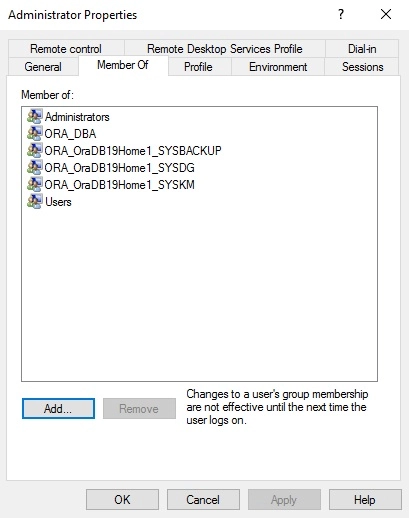
User Account Permission
- Administrator
- ORA_DBA
- ORA_OraDB19Home1_SYSBACKUP
- ORA_OraDB19Home1_SYSDG
- ORA_OraDB19Home1_SYSKM
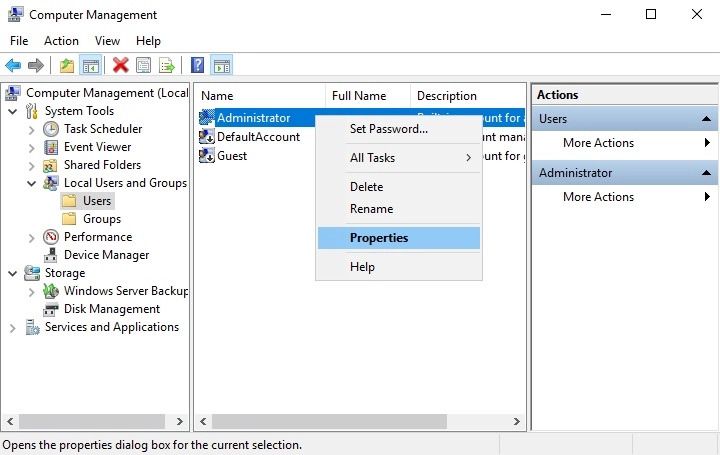
To verify, click the start menu and search for “Computer Management”. Open the application. Locate the Oracle security groups through Computer Management (Local) > System Tools > Local Users and Groups > Users. Right-click Administrator and select Properties.
Click the Member Of tab to see the list of Oracle security groups.
Oracle Database-Related Windows Services
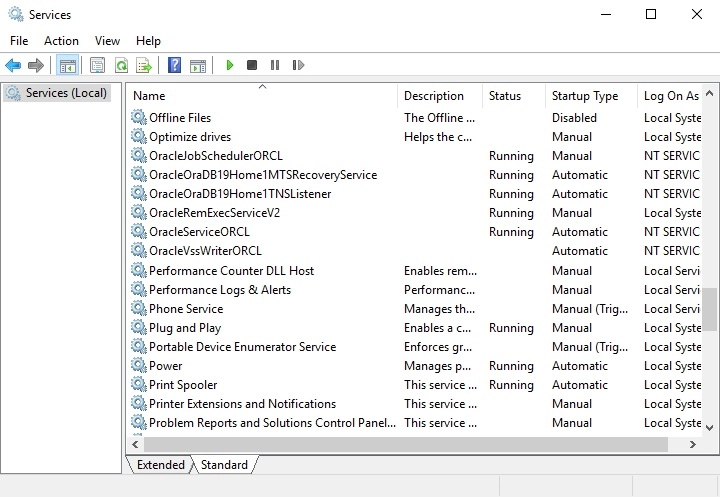
Ensure that all Oracle database-related services are started:
- OracleJobScheduler$SID$
- OracleOraDB19Home1MTSRecoveryService
- OracleOraDB19Home1TNSListener
- OracleRemExecServiceV2
- OracleService$SID$
To verify, click the start menu and search for “Services”. Look for the Oracle database-related services. Their statuses should be “Running”.
Linux Requirements
Supported OS Version
The backup of Oracle 19C is supported in Red Hat Enterprise Linux 8 or above.
GUI Desktop Environment
The Linux machine must be installed with a GUI desktop environment (i.e., GNOME, KDE, Cinnamon, etc.).
Oracle Requirements
Oracle Tools
Although the following tools are usually installed by default on all Oracle database installations, ensure that the following tools are installed on the Oracle database server, and functioning correctly.
-
RMAN (Recovery manager) - is require by Ahsay Go for both full database and archive log backups.
To verify if RMAN is installed on the Oracle database server and is working properly, run the following command.
Example of RMAN running in Oracle 19C
C:\Users\Administrator>set ORACLE_SID=orcl C:\Users\Administrator>rman target / Recovery Manager: Release 19.0.0.0.0 - Production on Mon May 25 14:02:48 2026 Version 19.3.0.0.0 Copyright (c) 1982, 2019, Oracle and/or its affiliates. All rights reserved. connected to target database: ORCL (DBID=1562659286) RMAN> -
SQL*Plus - is required by Ahsay Go during Oracle Backup Set creation, backup and restore.
To verify if SQL*Plus is installed on the Oracle database server and is working properly, run the following command sqlplus / as sysdba.
Example of SQL*Plus running in Oracle 19C
C:\Users\Administrator>sqlplus / as sysdba
SQL*Plus: Release 19.0.0.0.0 - Production on Mon May 25 14:05:53 2026
Version 19.3.0.0.0

Copyright (c) 1982, 2019, Oracle. All rights reserved.

Connected to:
Oracle Database 19c Enterprise Edition Release 19.0.0.0.0 - Production
Version 19.3.0.0.0
SQL>
Oracle Internal Process Checking
For the Oracle instance to run smoothly, ensure that the following internal processes are working well:
- PMON (Process Monitor)
- PSPO (Process Spawner Process)
- MMAN (Memory Manager Process)
- DBWO (Database Writer)
- ARCO (Archive Process (or thread on Windows))
- LGWR (Log Writer)
- CKPT (Checkpoint process (thread on Windows) that runs by default on Windows)
- SMON (System Monitor)
- RECO (Distributed Recovery Background Process)
To check this, click the start menu and search for “cmd”. Open the command prompt as administrator.
Run the SQL*Plus to connect to the Oracle database server. Once connected, use the following SQL query to verify if the internal processes are running.
C:\Users\Administrator>sqlplus / as sysdba
SQL*Plus: Release 19.0.0.0.0 - Production on Mon May 25 14:05:53 2026
Version 19.3.0.0.0
Copyright (c) 1982, 2019, Oracle. All rights reserved.
Connected to:
Oracle Database 19c Enterprise Edition Release 19.0.0.0.0 - Production
Version 19.3.0.0.0
SQL> select name, description from v$bgprocess where PADDR <> '00';

NAME  DESCRIPTION
----- --------------------------------------------------------
PMON  process cleanup
CLMN  process cleanup
PSP0  process spawner 0
VKTM  Virtual Keeper of TiMe process
GEN0  generic0
MMAN  Memory Manager
VKRM  Virtual sKeduler for Resource Manager
GEN1  generic1
DIAG  diagnosibility process
DBRM  DataBase Resource Manager
SVCV  services background monitor

NAME  DESCRIPTION
----- --------------------------------------------------------
PMAN  process manager
DIA0  diagnosibility process 0
DBW0  db writer process 0
LGWR  Redo etc.
CKPT  checkpoint
LG00  Log Writer Slave
SMON  System Monitor Process
LG01  Log Writer Slave
SMCO  Space Manager Process
LG01  Log Writer Slave
RECO  distributed recovery
Q00A  QMON MS

NAME  DESCRIPTION
----- --------------------------------------------------------
LREG  Listener Registration
W001  space management slave pool
M000  MMON slave class 1
PXMN  PX Monitor
FENC  IOServer fence monitor
M001  MMON slave class 1
MMON  Manageability Monitor Process
MMNL  Manageability Monitor Process 2
D000  Dispatchers
S000  Shared servers
TMON  Transport Monitor
P000  Parallel query slave

NAME  DESCRIPTION
----- --------------------------------------------------------
M002  MMON slave class 1
P001  Parallel query slave
P002  Parallel query slave
TT00  Redo Transport
TT01  Redo Transport
TT02  Redo Transport
AQPC  AQ Process Coord
CJQ0  Job Queue Coordinator
P003  Parallel query slave
P004  Parallel query slave
P005  Parallel query slave

NAME  DESCRIPTION
----- --------------------------------------------------------
P006  Parallel query slave
P007  Parallel query slave
W001  space management slave pool
W005  space management slave pool
W002  space management slave pool
W007  space management slave pool
M003  MMON slave class 1
M004  MMON slave class 1
W000  space management slave pool
W006  space management slave pool
W003  space management slave pool

NAME  DESCRIPTION
----- --------------------------------------------------------
W004  space management slave pool
QM02  QMON MS
Q003  QMON MS

58 rows selected.
SQL>
Supported Oracle Database Server Version
Ahsay Go supports the following versions of Oracle database server:
- Oracle 19c
- Oracle 18c
- Oracle 12c
To verify if the Oracle database server version is supported by Ahsay Go, use the following SQL query.
Example: Oracle 19c
C:\Users\Administrator>sqlplus / as sysdba
SQL*Plus: Release 19.0.0.0.0 - Production on Mon May 25 14:33:25 2026
Version 19.3.0.0.0
Copyright (c) 1982, 2019, Oracle. All rights reserved.
Connected to:
Oracle Database 19c Enterprise Edition Release 19.0.0.0.0 - Production
Version 19.3.0.0.0
System Identifier (SID)
Make sure the System Identifier (SID) is correct by using the following SQL query.
-
Windows
SQL> select instance from v$thread; INSTANCE --------------------------------------------------------------- orcl SQL> -
Linux
SQL> select instance from v$thread;
INSTANCE
---------------------------------------------------------------
cdb1
SQL>
The instance shown is just an example. The SID may be different on your Oracle instance.
Another way to verify the SID is by checking the init.ora file. Go to the:
Directory for Windows
D:\oracle\admin\orcl\pfileDirectory for Linux
/u01/app/oracle/admin/cdb1/pfile
Then, open the init.ora file using a text editor (e.g. Notepad++ for Windows and vi for Linux).
###########################################
# Database Identification
###########################################
db_name="orcl"
Oracle_Home Path
Example: Oracle 19c
The Oracle_Home path can be obtained by using the following SQL query. The Oracle_Home path for Oracle 19c is “D:\app\oracle\19.0.0\dbhome_1” for Windows and “/u01/app/oracle/product/19.0.0/dbhome_1” for Linux.
SQL> SELECT file_spec FROM DBA_LIBRARIES WHERE library_name =
'DBMS_SUMADV_LIB';
FILE_SPEC
---------------------------------------------------------------
D:\app\oracle\19.0.0\dbhome_1\bin\oraqsmashr.dll
SQL>
The instance shown is just an example. The SID may be different on your Oracle instance.
Another way to verify the Oracle_Home path is by checking the init.ora file. Go to the D:\oracle\admin\orcl\pfile directory and open the init.ora file using a text editor (e.g. Notepad++ for Windows and vi for Linux).
###########################################
# File Configuration
###########################################
control_files=("D:\app\oracle\oradata\ORCL\control01.ctl",
"D:\app\oracle\oradata\ORCL\control02.ctl")
###########################################
Example of an SQL query return with a null value of the Oracle_Home path
If any of the following scenario is encountered, please contact the Oracle database administrator for further assistance:
- The value of the Oracle_Home path in init.ora file does not match the value obtained from the SQL query.
- The SQL query returns an empty or null value.
SQL> SELECT file_spec FROM DBA_LIBRARIES WHERE library_name =
'DBMS_SUMADV_LIB';
no rows selected
SQL>
Database Status
Ensure that the status of Oracle instance is "Open". To check, use the following query.
SQL> select instance_name, status from v$instance;
INSTANCE_NAME  STATUS
-------------- ---------------------------------------------
orcl           OPEN
SQL>
Archived Log Mode
Ensure that the database instance is in Archived Log mode. To check, use the following command.
SQL> archive log list;
Database log mode 				Archive Mode
Automatic archival 				Enabled
Archive destination 			USE_DB_RECOVERY_FILE_DEST
Oldest online log sequence 		101
Next log sequence to archive 	103
Current log sequence 			103
SQL>
The values shown are just examples and might be different on your Oracle instance.
Java Installation
Java must be installed on the Oracle Database. To check if Java is installed, use the following SQL query. The status of the JServer JAVA Virtual Machine and Oracle Database Java Packages should be “VALID”.
SQL> select comp_name, status from dba_registry;
COMP_NAME                            STATUS
------------------------------------ ------------
Oracle Database Catalog Views        VALID
Oracle Database Packages and Types   VALID
Oracle Real Application Clusters     OPTION OFF

COMP_NAME                            STATUS
------------------------------------ ------------
JServer JAVA Virtual Machine         VALID
Oracle XDK                           VALID
Oracle Database Java Packages        VALID

COMP_NAME                            STATUS
------------------------------------ ------------
OLAP Analytic Workspace              VALID
Oracle XML Database                  VALID
Oracle Workspace Manager             VALID

COMP_NAME                            STATUS
------------------------------------ ------------
Oracle Text                          VALID
Oracle Multimedia                    VALID
Spatial                              VALID

COMP_NAME                            STATUS
------------------------------------ ------------
Oracle OLAP API                      VALID
Oracle Label Security                VALID
Oracle Database Vault                VALID

15 rows selected.

SQL>
If the status of the JServer JAVA Virtual Machine and/or the Oracle Database Java Packages is INVALID, please contact the Oracle database administrator for further assistance.
JAVASYSPRIV Permission for Oracle System Account
The Oracle system account is used by Ahsay Go to connect to the Oracle database server to authenticate the backup and restore process. The following permission must be assigned to the system account. Use the following SQL query to assign.
SQL> select * from DBA_ROLE_PRIVS where upper(grantee)='SYSTEM';
GRANTEE GRANTED_ROLE          ADM DEL DEF COM INH
------- --------------------- --- --- --- --- ---
SYSTEM  DBA                   NO  NO  YES YES NO
SYSTEM  JAVASYSPRIV           NO  NO  YES NO  NO

GRANTEE GRANTED_ROLE          ADM DEL DEF COM INH
------- --------------------- --- --- --- --- ---
SYSTEM  AQ_ADMINISTRATOR_ROLE YES NO  YES YES NO

SQL>
If not, grant javasyspriv to the system account by using the following SQL query.
SQL> grant javasyspriv to system;
Grant succeeded.
SQL>
SYSDBA Privileges for Oracle System Account
To check if the system account has sysdba privileges, use the following SQL query.
SQL> select * from v$pwfile_users where sysdba='TRUE';
USERNAME SYSDB SYSOP SYSAS SYSBA SYSDG SYSKM ACCOUNT_STATUS
-------- ----- ----- ----- ----- ----- ----- --------------
SYST     TRUE  FALSE FALSE OPEN
SQL>
If not, grant sysdba to the system account using the following SQL query.
-
Oracle 19c ad Oracle 18c
SQL> grant sysdba to system container=ALL; Grant succeeded. SQL> -
Oracle 12c
SQL> grant sysdba to system;
Grant succeeded.
SQL>
TNS Listener Service
TNS listener service must be started to allow connections to the Oracle database server. To check if the TNS listener service is running, use the "lsnrctl status" command.
If the TNS listener service is not started, use the "lsnrctl start" command to start the service.
Example: A running TNS Listener service on Oracle 19c
C:\Users\Administrator>lsnrctl status

LSNRCTL for 64-bit Windows: Version 19.0.0.0.0 - Production on 25-MAY-2026 15:39:05

Copyright (c) 1991, 2019, Oracle. All rights reserved.

Connecting to (DESCRIPTION=(ADDRESS=(PROTOCOL=TCP)(HOST=ora19cw2k16)(PORT=1521)))
STATUS of the LISTENER
------------------------
Alias 					  LISTENER
Version 				  TNSLSNR for 64-bit Windows: Version 19.0.0.0.0 - Production
Start Date 				  18-JUL-2024 11:11:04
Uptime 					  178 days 21 hr. 25 min. 28 sec
Trace Level 			  off
Security 				  ON: Local OS Authentication
SNMP 					  OFF
Listener Parameter File	  D:\oracle\19.3.0\dbhome\network\admin\listener.ora
Listener Log File 		  D:\oracle\diag\tnslsnr\ora19cw2k16\listener\alert\log.xml
Listening Endpoints Summary...
 (DESCRIPTION=(ADDRESS=(PROTOCOL=tcp)(HOST=ora19c-w2k16)(PORT=1521)))
 (DESCRIPTION=(ADDRESS=(PROTOCOL=ipc)(PIPENAME=\\.\pipe\EXTPROC1521ipc))) (DESCRIPTION=(ADDRESS=(PROTOCOL=tcps)(HOST=ora19cw2k16)(PORT=5500))(Security=(my_wallet_directory=D:\ORACLE\admin\orcl\xdb_wallet))(Presentation=HTTP)(Session=RAW))
Services Summary...
Service "52448234712340b69f274bcc790ecfe0" has 1 instance(s).
 Instance "orcl", status READY, has 1 handler(s) for this service...
Service "9400891b61bb4c4c8b3997957ffa8c8e" has 1 instance(s).
 Instance "orcl", status READY, has 1 handler(s) for this service...
Service "CLRExtProc" has 1 instance(s).
 Instance "CLRExtProc", status UNKNOWN, has 1 handler(s) for this service...
Service "orcl" has 1 instance(s).
 Instance "orcl", status READY, has 1 handler(s) for this service...
Service "orclXDB" has 1 instance(s).
 Instance "orcl", status READY, has 1 handler(s) for this service...
Service "orclpdb" has 1 instance(s).
 Instance "orcl", status READY, has 1 handler(s) for this service...
The command completed successfully

C:\Users\Administrator>
The values shown are just examples and might be different on your Oracle instance.
Localhost is Resolvable
Verify if the localhost IP 127.0.0.1 on the Oracle database server is resolvable using the command "ping 127.0.0.1" as this will be the IP address that AhsayOBM will use to connect to the Oracle instance.
C:\Users\Administrator>ping 127.0.0.1
Pinging 127.0.0.1 with 32 bytes of data:
Reply from 127.0.0.1: bytes=32 time<1ms TTL=128
Reply from 127.0.0.1: bytes=32 time<1ms TTL=128
Reply from 127.0.0.1: bytes=32 time<1ms TTL=128
Reply from 127.0.0.1: bytes=32 time<1ms TTL=128
Ping statistics for 127.0.0.1:
 Packets: Sent = 4, Received = 4, Lost = 0 (0% loss),
Approximate round trip times in milli-seconds:
 Minimum = 0ms, Maximum = 0ms, Average = 0ms
C:\Users\Administrator>
Oracle Port Number
The default Oracle port number is 1521. To check, use the "netstat" and "tnsping" commands to verify the actual port number.
NETSTAT
C:\Users\Administrator>netstat -pan|more
Active Connections
Proto Local Address Foreign Address State
TCP 0.0.0.0:135 ora19c-w2k16:0 LISTENING
TCP 0.0.0.0:445 ora19c-w2k16:0 LISTENING
TCP 0.0.0.0:1521 ora19c-w2k16:0 LISTENING
TCP 0.0.0.0:2179 ora19c-w2k16:0 LISTENING
TCP 0.0.0.0:3389 ora19c-w2k16:0 LISTENING
TCP 0.0.0.0:5500 ora19c-w2k16:0 LISTENING
TCP 0.0.0.0:5985 ora19c-w2k16:0 LISTENING
TCP 0.0.0.0:47001 ora19c-w2k16:0 LISTENING
TCP 0.0.0.0:49664 ora19c-w2k16:0 LISTENING
TCP 0.0.0.0:49665 ora19c-w2k16:0 LISTENING
TCP 0.0.0.0:49666 ora19c-w2k16:0 LISTENING
TCP 0.0.0.0:49667 ora19c-w2k16:0 LISTENING
TCP 0.0.0.0:49668 ora19c-w2k16:0 LISTENING
TCP 0.0.0.0:49669 ora19c-w2k16:0 LISTENING
TCP 0.0.0.0:49670 ora19c-w2k16:0 LISTENING
TCP 0.0.0.0:49697 ora19c-w2k16:0 LISTENING
TCP 10.16.10.123:139 ora19c-w2k16:0 LISTENING
TCP 10.16.10.123:2030 ora19c-w2k16:0 LISTENING
TCP 10.16.10.123:3389 192.168.12.1:56719 ESTABLISHED
TCP 10.16.10.123:49671 40.90.189.152:https ESTABLISHED
TCP 10.16.10.123:49690 40.90.189.152:https ESTABLISHED
TCP 10.16.10.123:51761 ti-in-f95:https ESTABLISHED
TCP 127.0.0.1:1521 ora19c-w2k16:51740 ESTABLISHED
TCP 127.0.0.1:51740 ora19c-w2k16:1521 ESTABLISHED
TCP 172.16.10.123:139 ora19c-w2k16:0 LISTENING
-- More --
The values shown are just examples and might be different on your Oracle instance.
TNSPING
C:\Users\Administrator>tnsping 127.0.0.1
TNS Ping Utility for 64-bit Windows: Version 19.0.0.0.0 - Production on
14-OCT-2020 16:54:27
Copyright (c) 1997, 2019, Oracle. All rights reserved.
Used parameter files:
D:\oracle\19.3.0\dbhome\network\admin\sqlnet.ora
Used EZCONNECT adapter to resolve the alias
Attempting to contact
(DESCRIPTION=(CONNECT_DATA=(SERVICE_NAME=))(ADDRESS=(PROTOCOL=tcp)(HOST=
127.0.0.1)(PORT=1521)))
OK (10 msec)
C:\Users\Administrator>