

 AhsayCBS
Ahsay Go - Microsoft Hyper-V Requirements
Ahsay Go Installation
The latest version of Ahsay Go must be installed on the Hyper-V server. For Hyper-V Cluster environment, the latest version of Ahsay Go must be installed on all Cluster nodes.
Storage Quota
Ahsay Go user account has sufficient quota assigned to accommodate the storage of the guest VMs. You may check this from Settings > Subscription Plan.
Hyper-V guest VMs contain three types of virtual disks:
- Fixed Hard Disk
- Dynamic Hard Disk
- Differencing Hard Disk
When Ahsay Go backs up a Hyper-V guest VMs for an initial or subsequent full backup job:
- Using fixed Hard Disks, it will back up the provisioned size, e.g. for a 500GB fixed virtual hard disk 500GB will be backed up to the storage designation.
- Using Dynamic Hard Disk or Differencing Hard Disk, it will back up the used size, e.g. for a 500GB fixed virtual hard disk, 20GB will be backed up to the storage designation if only 20GB was used.
As compression is not enabled for Granular backup sets, to optimize restore performance, the storage quota required will be higher than non-Granular backup sets. Contact your backup service provider for details.
Java Heap Size
The default Java heap size setting on Ahsay Go is 2048MB. For Hyper-V backups, it is highly recommended to increase the Java heap size setting to improve backup and restore performance. (The actual heap size is dependent on amount of free memory available on your Hyper-V server).
Delta generation of large VHD files is a memory intensive process; therefore, it is recommended that the Java heap size to be at least 2048MB - 4096MB. The actual required Java heap size is subject to various factors including files size, delta mode, backup frequency, etc.
Permission
The Windows login account used for installation and operation of the Ahsay Go client machine requires Administrator privileges.
The operating system account for setting up the Hyper-V / Hyper-V Cluster backup set must have administrator permission (e.g. administrative to access the cluster storage).
For Granular Restore, Windows User Account Control (UAC) must be disabled.
Temporary Directory
For stand-alone Hyper-V server, Ahsay Go uses the temporary folder for storing backup set index files and any incremental or differential delta files generated during a backup job. To ensure optimal backup / restore performance, it should be located on a local drive with plenty of free disk space and it should not be on the following drive:
Windows System C:\ driveFor Hyper-V Server in Failover Cluster Environment
Hyper-V Server 2016 and 2019, 2022, 2025 the temporary directory must be set to the Cluster Shared Volume (CSV).
For Hyper-V Server in Non-Cluster Environment
For Hyper-V Server 2016, 2019, 2022, 2025 in a Non-Cluster environment, the temporary directory must be set to a local drive on the Hyper-V Server.
Network Drive
The login accounts for network drives must have read and write access permission to ensure that backup and restore would be successful.
Hyper-V Services
-
The Hyper-V management tools are installed on the server. For Hyper-V Cluster environments, the Hyper-V management tools is installed on all Cluster nodes.
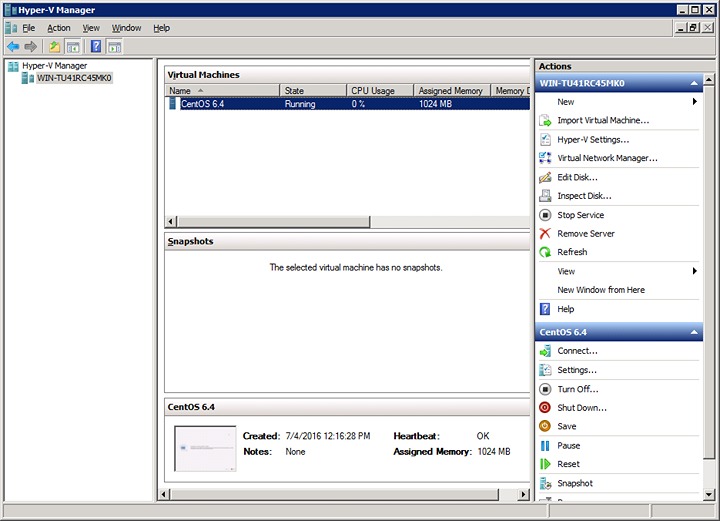
-
The Hyper-V services are started on the server. For Hyper-V Cluster environments the HyperV services are started on all Cluster nodes.
Example: Windows Server 2016
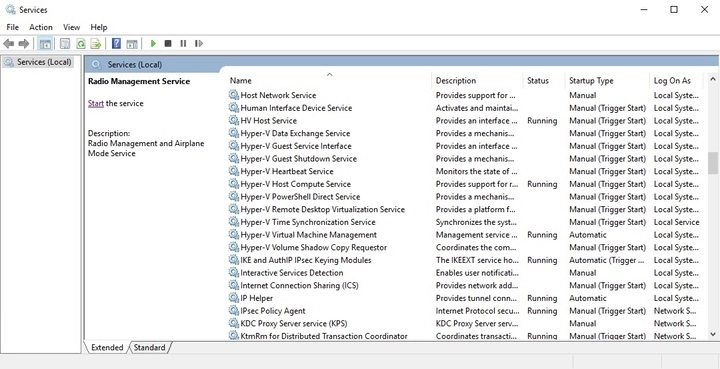
-
The Microsoft Hyper-V VSS Writer is installed and running on the Hyper-V server and the writer is state is Stable. This can be verified by running the following command:
vssadmin list writersExample:
C:\Users\Administrator>vssadmin list writers vssadmin 1.1 - Volume Shadow Copy Service administrative command-line tool (C) Copyright 2001-2005 Microsoft Corp. Writer name: 'Task Scheduler Writer' Writer Id: {d61d61c8-d73a-4eee-8cdd-f6f9786b7124} Writer Instance Id: {1bddd48e-5052-49db-9b07- b96f96727e6b} State: [1] Stable Last error: No error Writer name: 'VSS Metadata Store Writer' Writer Id: {75dfb225-e2e4-4d39-9ac9-ffaff65ddf06} Writer Instance Id: {088e7a7d-09a8-4cc6-a609- ad90e75ddc93} State: [1] Stable Last error: No error Writer name: 'Performance Counters Writer' Writer Id: {0bada1de-01a9-4625-8278-69e735f39dd2} Writer Instance Id: {f0086dda-9efc-47c5-8eb6- a944c3d09381} State: [1] Stable Last error: No error Writer name: 'System Writer' Writer Id: {e8132975-6f93-4464-a53e-1050253ae220} Writer Instance Id: {8de7ed2b-8d69-43dd-beec5bfb79b9691c} State: [1] Stable Last error: No error Writer name: 'SqlServerWriter' Writer Id: {a65faa63-5ea8-4ebc-9dbd-a0c4db26912a} Writer Instance Id: {1f668bf9-38d6-48e8-81c4- 2df60a3fab57} State: [1] Stable Last error: No error Writer name: 'ASR Writer' Writer Id: {be000cbe-11fe-4426-9c58-531aa6355fc4} Writer Instance Id: {01499d55-61da-45bc-9a1e76161065630f} State: [1] Stable Last error: No error Writer name: 'Microsoft Hyper-V VSS Writer' Writer Id: {66841cd4-6ded-4f4b-8f17-fd23f8ddc3de} Writer Instance Id: {a51919e3-0256-4ecf-8530- 2f600de6ea68} State: [1] Stable Last error: No error Writer name: 'COM+ REGDB Writer' Writer Id: {542da469-d3e1-473c-9f4f-7847f01fc64f} Writer Instance Id: {7303813b-b22e-4967-87a3- 4c6a42f861c4} State: [1] Stable Last error: No error Writer name: 'Shadow Copy Optimization Writer' Writer Id: {4dc3bdd4-ab48-4d07-adb0-3bee2926fd7f} Writer Instance Id: {d3199397-ec58-4e57-ad04- e0df345b5e68} State: [1] Stable Last error: No error Writer name: 'Registry Writer' Writer Id: {afbab4a2-367d-4d15-a586-71dbb18f8485} Writer Instance Id: {25428453-2ded-4204-800fe87204f2508a} State: [1] Stable Last error: No error Writer name: 'BITS Writer' Writer Id: {4969d978-be47-48b0-b100-f328f07ac1e0} Writer Instance Id: {78fa3f1e-d706-4982-a826- 32523ec9a305} State: [1] Stable Last error: No error Writer name: 'WMI Writer' Writer Id: {a6ad56c2-b509-4e6c-bb19-49d8f43532f0} Writer Instance Id: {3efcf721-d590-4e50-9a37- 845939ca51e0} State: [1] Stable Last error: No error -
Integration Service
- If Integration services is not installed / updated on a guest VM or the guest operating system is not supported by Integration Services, the corresponding VM will be paused or go into a saved state during the snapshot process for both backup and restore, and resume when the snapshot is completed. Furthermore, the corresponding VM uptime will also be reset to 00:00:00 in the Hyper-V Manager.
-
Installing or updating Integration Services guest VM(s) may require a restart of the guest VM to complete the installation.
-
To install Integration Services:
-
In Hyper-V Manager connect to the guest VM and select Action > Insert Integration Services Setup disk
Example: Windows 7 Enterprise guest
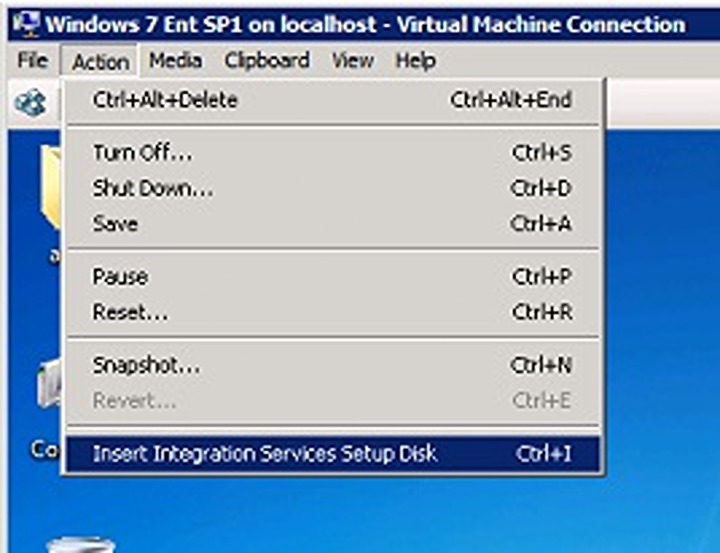
-
If the guest operating system supports live VM backup, the Backup (volume snapshot) is enabled.
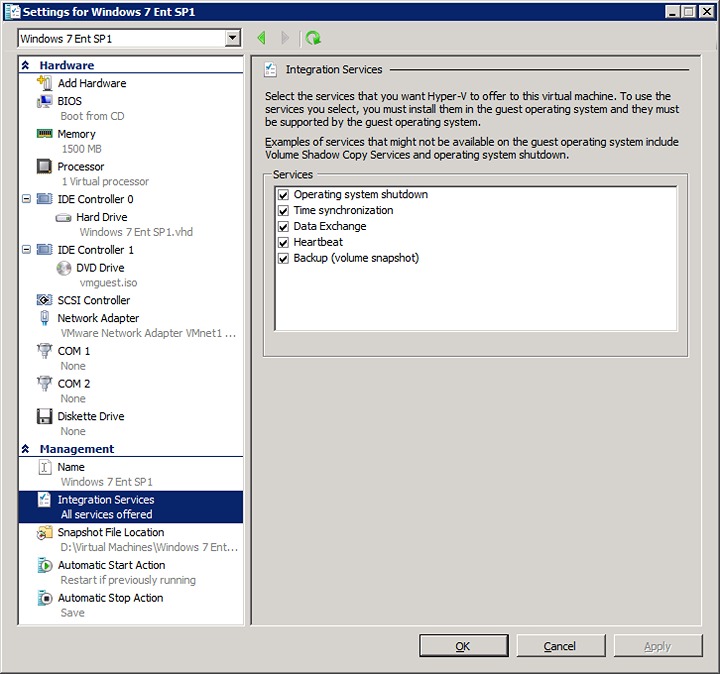
-
-
The related Integration Services are running on the guest VM.
-
To check if Linux Integration Services is running on the Linux guest.
-
Please refer to the following articles for further details:
- Supported Linux and FreeBSD virtual machines for Hyper-V on Windows Server and Windows
- Supported CentOS and Red Hat Enterprise Linux virtual machines on Hyper-V
- Supported Ubuntu virtual machines on Hyper-V
- Linux Integration Services Version 4.0 for Hyper-V
- Manage Hyper-V Integration Services
- Hyper-V on Windows Server
-
- For Run Direct Hyper-V Cluster backup sets the storage destination must be accessible by all Hyper-V nodes.
- For Hyper-V Cluster backup sets, the guest VMs must be created and managed by the Failover Cluster Manager.
Hyper-V Backup Methods
Ahsay Go supports two methods for Hyper-V guest VM backup, VM Snapshot and Saved State.
VM Snapshot
The VM snapshot method is the preferred backup option, as it supports live guest VM backups. This means guest VM will not be put into a saved state when a VSS snapshot is taken during a backup job. So, it will not affect the availability of any applications or services running on the guest VM every time a backup job is performed.
If the VM Snapshot method cannot be used, Ahsay Go will automatically use the Saved State method.
- The guest VM must be running.
- Integration services must be enabled on the guest VM.
- The Hyper-V Volume Shadow Copy Requestor service is running on the guest VM installed with Windows operating system. Please refer to the following article for further details: Hyper-V Volume Shadow Copy Requestor
-
For guest VMs installed with Linux operating systems, the VSS Snapshot daemon is required for live backups, not all Linux versions support live backup on Hyper-V. For example, only Ubuntu version 14.04 LTS to 17.04 LTS supports live backups.
Please refer to the following article for further details:
Supported Linux and FreeBSD virtual machines for Hyper-V on Windows Server and Windows
- The guest VM volumes must use a file system which supports the use of VSS snapshots, i.e. NTFS or ReFS.
- The guest VMs snapshot file location must be set to the same volume in the Hyper-V host as the VHD file(s).
- The guest VM volumes have to reside on basic disks. Dynamic disks cannot be used within the guest VM.
Saved State
If any of the VM Snapshot method requirements cannot be fulfilled, Ahsay Go will automatically use the Saved State method. When the Saved State method is used, the guest VM is placed into a saved state while the VSS snapshot is created (effectively shut down), and the duration is dependent on the size of VM and performance of Hyper-V host. The downside is it may affect the availability of any applications or services running on the guest VM every time a backup job is performed.
Windows Server 2016 and 2019 RCT Requirement
- Ahsay Go would use the native built-in RCT (Resilient Change Tracking) feature of Windows server 2016 and 2019.
-
The guest VM version in Hyper-V must be 8.0 or above.
Example:
-
This can be verified by using Windows PowerShell.
get-VM | fomat-table name, version
-
If the version is not 8.0 or above, then the VM configuration version needs to be upgraded.
Update-VMversion <vmname>
Please refer to the following link from Microsoft for details about the VM version:
Upgrade virtual machine version in Hyper-V on Windows or Windows Server
-
Hyper-V Cluster Setup
For Hyper-V Cluster backup sets:
- The same version of Ahsay Go must be installed on all Hyper-V Cluster nodes.
- All Hyper-V Cluster nodes must be running the same Windows version.
- The same backup user account must be used for all nodes.
- The same backup set must be used for all nodes.
- The backup schedule must be enabled on all Hyper-V Cluster nodes.
Guest VM Dependencies
To get full use of Hyper-V, install the appropriate linux-tools and linux-cloud-tools packages to install tools and daemons, e.g. VSS Snapshot Daemon, for use with VMs. Please refer to the following link for the details of requirements for Ubuntu relating to Hyper-V daemons:
Supported Ubuntu virtual machines on Hyper-V
For ease of restore, it is recommended to back up the whole VM (all the virtual disks) rather than individual virtual disks.
Run Direct Restore
Supported Guest VM Operating System
Guest VM running on Windows and Linux are supported for Run Direct Restore.
For Restore to the Original Hyper-V Host
- Ahsay Go UI must be running when a guest VM is started using Run Direct Restore or when migration process is running.
- For local, mapped drive, or removable drive storage destinations with Run Direct enabled, the compression type will always be set to No Compression and data encryption is disabled to ensure optimal backup and restore performance. The backup set compression type and data encryption settings will only be applied to Ahsay Drive, SFTP/FTP, or Cloud storage destinations.
- Run Direct restore can only be performed on one guest VM at a time.
- Restored guest VMs using Run Direct containing a saved state will not automatically power on. The saved state must be manually deleted in Hyper-V Manager and the guest must be powered on manually.
- When a guest VM is started in a Run Direct instance and it is stopped, any changes made within the guest environment will be lost if the guest VM is not migrated to the Hyper-V Server using the “Auto migrate after Run Direct is running” option.
- When a guest VM is started using Run Direct Restore, all backup jobs (manual and scheduled) for the related backup set will be skipped.
- When a guest VM is started using Run Direct Restore, the following features are not available for the backup set; Data Integrity Check, Space Freeing Up, and Delete Backup Data.
For Restore to a Different (Standby) Hyper-V Host
- Ahsay Go must be installed on the Hyper-V Host where you wish to restore the guest VM.
- The same Ahsay Go backup account must be used.
- For restore to an alternate Hyper-V Host with a different CPU architecture, the latest version of Ahsay Go must be installed.
- The correct encryption key is required if the backup set was created with the encryption key feature enabled.
- A guest VM backed up from a standalone Hyper-V host can only be restored to another standalone Hyper-V host. A guest VM backed up from a Hyper-V Cluster can only be restored to another Hyper-V Cluster.
- Guest VM backed up to local drive / mapped drive / removable drive on the original HyperV host can be restored to another Hyper-V host only if the new machine has access to the original drive(s).
- The network configuration and structure of the standby Hyper-V host must be same with the original Hyper-V host.
- For Hyper-V restore, it is highly recommended to increase the Java heap size setting to improve performance, especially on guest VM’s with many incremental delta files. For further details, refer to Java Heap Size.
- For best restore performance, the temporary directory should be set to a local drive. Also, the temporary directory must have sufficient free disk space for the guest VM restore, for example, the restore of a 500GB guest VM with 30 incremental files of around 5GB each (500GB + 150GB (30 x 5GB)), the temporary directory will require at least 650GB of free space. For further details, refer to Temporary Directory.
-
Restore guest VM to Original Location is possible only if the disk setup on the new Hyper-V host is the same as the original Hyper-V host, for example if the original guest VM was backed up on G: drive. Then restore to “Original location” can be selected if G: drive is setup on the new Hyper-V host. Otherwise, select “Alternate location”.

- The Hyper-V management tools must be installed on the new Hyper-V host. For Hyper-V Cluster environments Hyper-V management tools must be installed on all Cluster nodes.
- The Hyper-V services must be started on the host. For Hyper-V Cluster environment, the Hyper-V services must be started on all Cluster nodes. For more details, refer to Hyper-V Services.
- Microsoft Hyper-V VSS Writer must be installed and running on the new Hyper-V host and the writer state must be Stable. This can be verified by running the vssadmin list writers command. For more details, refer to number 3 of Hyper-V Services.
Granular Restore
Operating System
Ahsay Go must be installed on a 64-bit Windows machine as libraries for Granular Restore only supports 64-bit Windows operating system. Refer to the following article for the list of compatible operating system for Granular Restore:
Software Compatibility for Granular & OpenDirect Restore in Ahsay Go.
Granular Restore is supported on Hyper-V backup sets created and backed up using Ahsay Go installed on a Windows platform with the Granular Restore feature enabled on the backup set.
Available Spare Drive Letter
One spare drive letter must be available on the Windows machine for the Granular Restore process, as the VHD virtual disk is mounted on Windows as a logical drive. Ahsay Go will automatically take the next available drive letter in alphabetical order for the mounted virtual disk.
- The Windows drive letters A, B, and C are not used by Granular Restore.
- The Granular Restore assigned drive letter(s) will be released once you exit from Ahsay Go UI.
Network Requirements
Recommended minimum network speed is at least 100Mbps download speed.
The network bandwidth requirements will increase in proportion to the size of the guest VM and/or the incremental delta chain length to ensure optimal performance. Working with limited network bandwidth may severely affect the Granular Restore performance.
You can use an online network speed test website (e.g. www.speedtest.net) to get an idea of the actual bandwidth of the machine.
It is recommended that a local destination is added to the backup set for faster Granular Restore. Since Granular Restore of large guest VM from Ahsay Drive over the internet can be slow depending on network bandwidth.
Other Dependencies
The following dependencies are required for restore and therefore they are verified by Ahsay Go only when a Granular Restore is performed. The absence of these dependencies will not affect the backup job but would cause the Granular Restore to fail.