

 AhsayCBS
[v9] Run on Server Backup and Restore
Ahsay Cloud Backup Suite v9 allows you to back up your Microsoft 365 data / data stored on a cloud storage to either the AhsayCBS backup server or another cloud storage without the need to deploy a backup agent. You can access the AhsayCBS server environment easily on a web-based management console. This is a user interface that allows you to login remotely to a backup server to manage and monitor your backups.
For Run on Server (Agentless) backup and restore, the AhsayCBS backup server connects to Microsoft 365 / cloud storage directly through the Internet without the need to deploy additional backup agents on the customer site.
Below is the system architecture diagram illustrating the major elements involved in the backup and restore process using Ahsay Run on Server (Agentless) backup configuration.
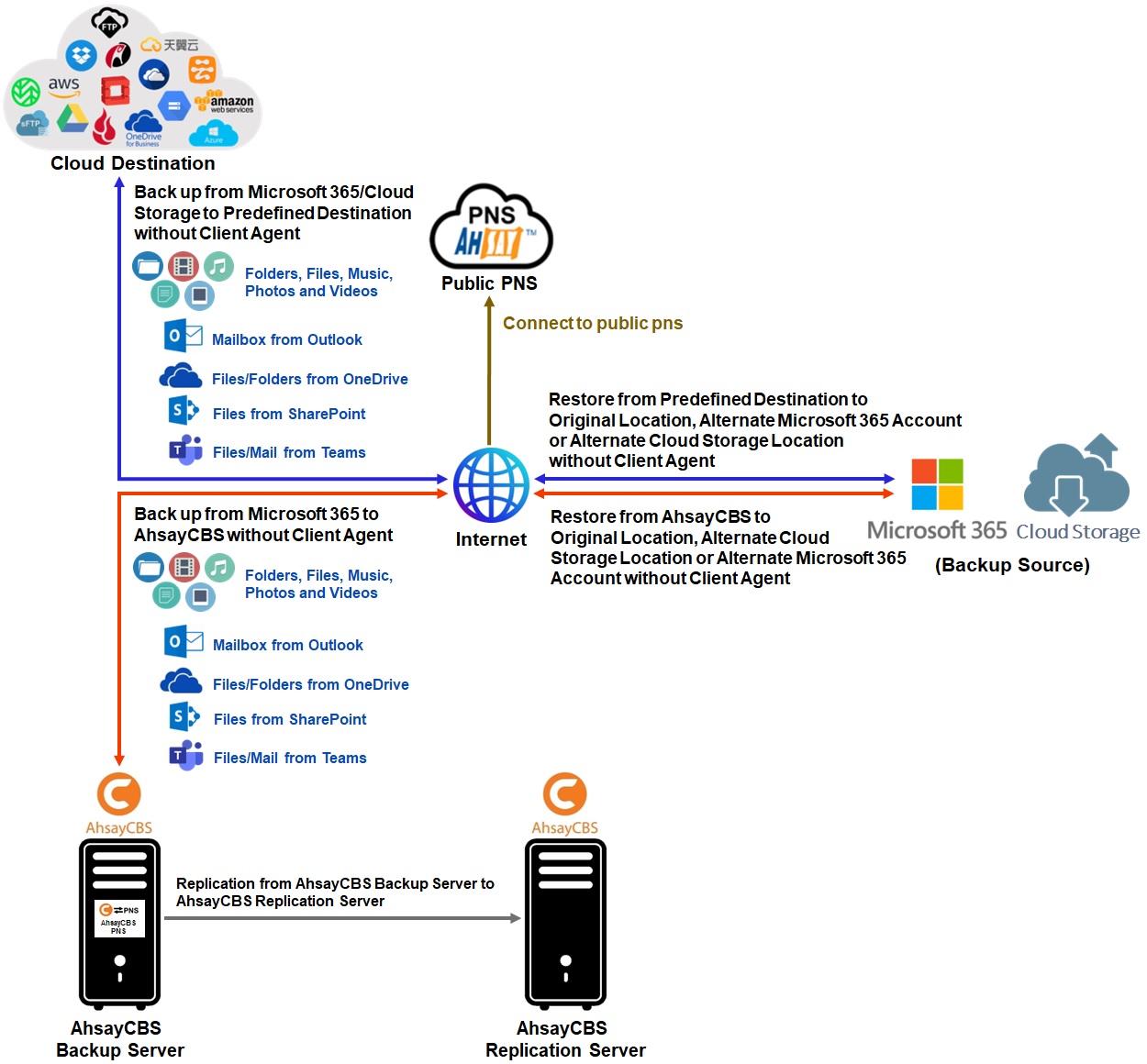
Run on Server
A Run on Server backup set provides you with an agentless backup solution. Manual or scheduled backup job is performed directly on the AhsayCBS backup server. You do not need to install a backup agent on your personal computer in order to back up your data on Microsoft 365 / cloud storage(s).
Run on Server (Agentless) backup and restore can be managed on a computer or device running on Windows/macOS/Linux /iOS/Android as long as the device is able to support a web browser and has an internet connection.
Differences between a Run on Server and Run on Client backup set
The following table summarizes the differences in backup options available between a Run on Server and Run on Client backup set, and the tool to use (web console or client agent) when performing a backup and restore.
| Features/Functions | Run on Server Backup Set | Run on Client Backup Set |
|---|---|---|
| General Settings | ✔ | ✔ |
| Backup Source | ✔ | ✔ |
| Backup Schedule | ✔ | ✔ |
| Continuous Backup | ✖ | AhsayOBM / AhsayACB for Windows only |
| Destination | AhsayCBS or Predefined Destinations only | AhsayCBS, Local, Standard and Predefined Destinations |
| Multiple Destinations | ✖ | ✔ |
| Deduplication | AhsayOBM | AhsayOBM |
| Retention Policy | AhsayOBM | ✔ |
| Command Line Tool | ✖ | AhsayOBM / AhsayACB for Windows only |
| Reminder | ✖ | AhsayOBM / AhsayACB for Windows only |
| Restore Filter | ✖ | ✔ |
| Bandwidth Control | AhsayOBM | ✔ |
| IP Allowed for Restore | ✖ | ✔ |
| System Logs of Data Integrity Check and Space Freeing Up | ✖ | ✔ |
| Others | ✔ | ✔ |
| To Run a Backup | AhsayCBS User Web Console only | AhsayOBM / AhsayACB / AhsayOBR |
Aside from the backup options, the table below shows other operations that can be performed using web console and client agent:
| Features/Functions | Run on Server Backup Set | Run on Client Backup Set |
|---|---|---|
| Data Integrity Check | ✔ | ✔ |
| Space Freeing Up | ✔ | ✔ |
| Delete Backup Data | ✔ | ✔ |
| Decrypt Backup Data | ✖ | ✔ |
For further details, please refer to the following: