

 FAQ
FAQProxy
November 3, 2026
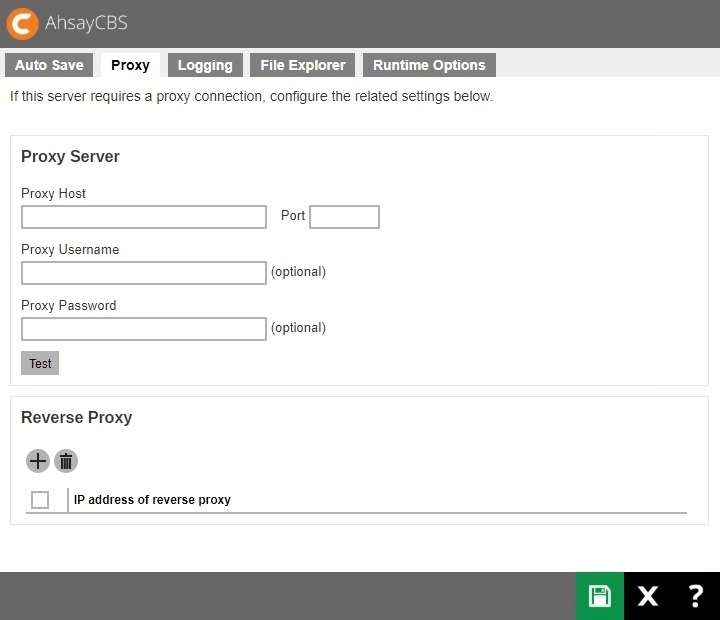
The following shows the “Proxy” tab under System Settings > Advanced. It is used to define the proxy connection if it is required by AhsayCBS to connect to the internet. It is also used to configure the IP address that can be used for reverse proxy.
Proxy Server
Two types of proxy, HTTP/HTTPS and SOCKS 4/5, are supported. You can use the “Proxy Host” and “Port” entries to define the location of your proxy server.
If the proxy server you are using requires user authentication, please use the “Proxy Username” and “Proxy Password” entries to set the username/password for your proxy server.
Please make sure there are no traffic restrictions on the proxy server, which could affect backup/restore performance.
Reverse Proxy
Click the Create button under “Reverse Proxy”.

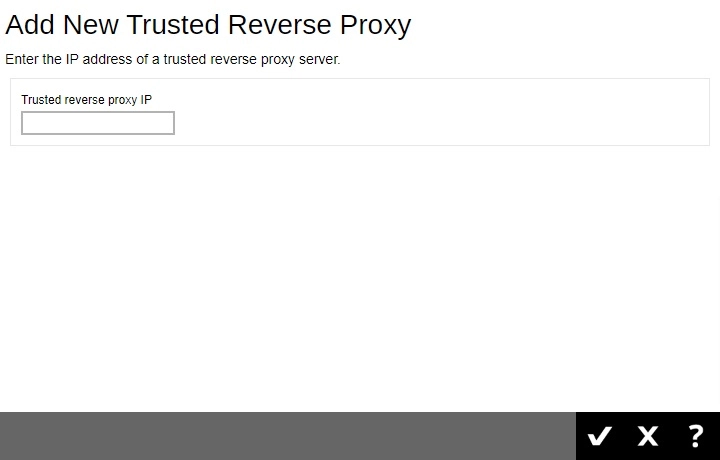
Enter the IP address. Click OK once done.
- Click Save to save the settings.