

 AhsayCBS (DIY)
VMware Workstation 25 Backup "error code=22002 unload Vix API Library"
August 21, 2026
Product Version
AhsayOBM : 10.1.6 and above
Operating System
Windows
Symptom
The following error message is displayed when backing up VMware Workstation 25 using AhsayOBM v10.1.6:
[erro] Failed to take snapshot of virtual machine. Error = "[Vmrun.executeCmd "VMCmd"] Unexpected LineCommand exception while executing 'snapshot'. Working Directory='.'. Error=[VMCmd] load Vix API Library: VixAllProductsDyn.dll The specified version was not found, vmx path=%VMDiskPath%.vmx, error code=22002 [VMCmd] unload Vix API Library > [VMCmd] load Vix API Library: VixAllProductsDyn.dll The specified version was not found, vmx path=%VMDiskPath%.vmx, error code=22002 [VMCmd] unload Vix API Library "Cause
This issue occurs because the VMware VIX installation does not contain Runtime Libraries for Workstation 25.
Resolution
To resolve the issue, first create a new folder Workstation-25.0.0 in C:\Program Files (x86)\VMware\VMware VIX\.
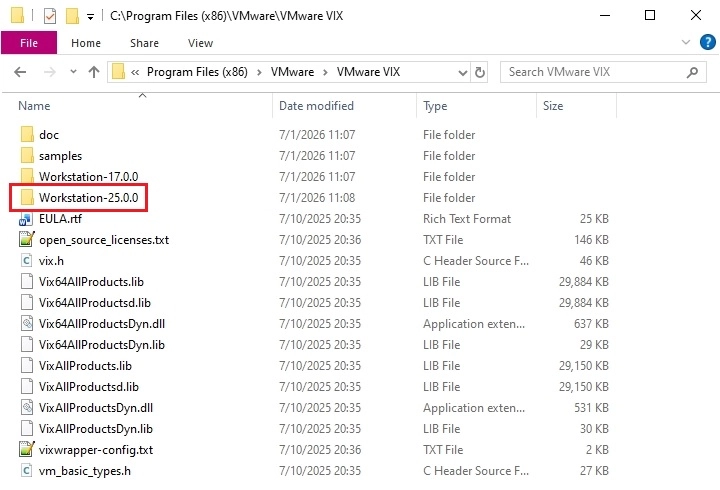
Then copy the content of C:\Program Files (x86)\VMware\VMware VIX\Workstation-17.0.0 to the created folder Workstation-25.0.0.